What Is a Tote Bag Mockup and Why It Matters
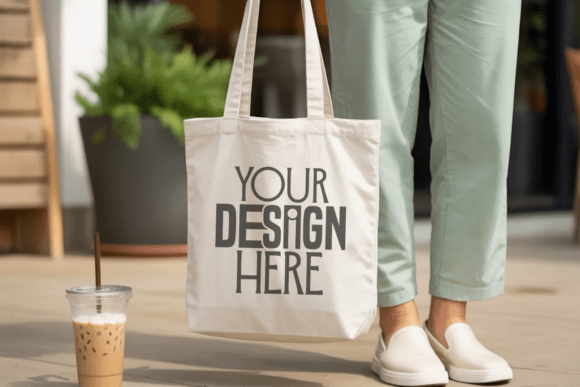
A tote bag mockup is a digital representation of a physical tote bag that allows designers, marketers, and small business owners to visualize how their artwork, branding, or content would look on an actual product. Unlike static images, a mockup provides a realistic context for your design, making it easier to showcase your work in a professional and appealing way. Whether you're creating a new brand identity, promoting a product, or building an online shop, a high-quality tote bag mockup can significantly enhance the presentation of your visuals.
Why Choose a Premium Minimal Mockup?
The Tote Bag Mockup stands out in the crowded market of design tools and templates by offering a clean, modern, and minimalist aesthetic. This type of mockup is designed with simplicity in mind, ensuring that your design remains the focal point without any distractions from background elements or unnecessary graphics.
One of the key advantages of this minimal approach is its versatility. Because it lacks text, tags, or watermarks, the mockup can be used across a wide range of applications, from social media graphics to print materials. This makes it an excellent choice for anyone looking to maintain a consistent visual style while presenting their work in a polished manner.
Comparing Tote Bag Mockups: What Sets This One Apart?
While there are many tote bag mockups available, not all are created equal. Some come with cluttered backgrounds, limited resolution, or overly complex designs that can detract from the intended message. The Tote Bag Mockup, on the other hand, prioritizes clarity and usability, making it a more practical option for professionals who value efficiency and impact.
For instance, if you're working on a project that requires a clean, uncluttered look—such as a branding campaign or a social media post—the minimal design of this mockup will help your visuals stand out. In contrast, a more detailed or stylized mockup might be better suited for creative presentations or artistic showcases where the background plays a role in the overall composition.
Key Features of the Tote Bag Mockup
- High-Quality JPG File: The mockup is delivered in a high-resolution JPG format, ensuring that your design looks sharp and professional at any size.
- 300 DPI Resolution: This level of detail is ideal for both digital and print use, allowing you to present your work with confidence.
- No Text or Watermarks: The clean design means you don’t have to worry about removing unwanted elements before using the mockup in your final project.
- Easy to Customize: With a simple layout, you can easily place your design on the tote bag and adjust it to fit your needs.
These features make the Tote Bag Mockup a reliable tool for anyone looking to elevate their design presentation without compromising on quality or aesthetics.
When to Use a Tote Bag Mockup
The Tote Bag Mockup is particularly useful when you need to showcase your artwork, branding, or promotional materials in a visually appealing way. For example, if you're launching a new line of products, a well-designed mockup can help you create compelling marketing materials that grab attention and communicate your brand’s identity effectively.
Additionally, this mockup is ideal for social media content. Platforms like Instagram, Pinterest, and Facebook require eye-catching visuals to engage audiences, and a high-quality mockup can help you stand out in a crowded feed. Whether you're posting a new graphic, sharing a design process, or promoting a product, the Tote Bag Mockup offers a versatile and professional solution.
Alternatives to Consider
While the Tote Bag Mockup is an excellent choice for many use cases, it's important to consider alternatives depending on your specific needs. For instance, if you're working on a project that requires a more dynamic or colorful background, you might want to explore other mockup styles that offer greater visual variety.
Some designers prefer mockups with textures or patterns, which can add depth and interest to their designs. Others may opt for 3D mockups, which provide a more realistic and immersive experience. However, these options often come with added complexity, requiring more time and effort to customize and integrate into your workflow.
Ultimately, the choice between a minimal mockup and a more elaborate one depends on your goals and the context in which you'll be using the design. If you're looking for a straightforward, efficient solution that focuses on clarity and professionalism, the Tote Bag Mockup is likely the best fit for your needs.
Limitations and Tradeoffs
Like any design tool, the Tote Bag Mockup has its limitations. One potential drawback is its lack of customization options. While the clean design is a strength, it may not be suitable for projects that require a more personalized or stylized approach.
Additionally, because the mockup is minimal, it may not be the best choice for certain types of content. For example, if you're showcasing intricate details or complex illustrations, a simpler background might not do them justice. In such cases, a more detailed or textured mockup could be a better option.
It's also worth noting that the Tote Bag Mockup is primarily designed for flat, two-dimensional designs. If you're working with 3D models or animations, you may need to explore other tools that support those formats.
Best Practices for Using the Tote Bag Mockup
To get the most out of the Tote Bag Mockup, it's important to follow a few best practices. First, always ensure that your design is properly aligned and scaled to fit the mockup. This will help maintain a professional appearance and avoid any visual distortions.
Second, consider the purpose of your design. If you're creating a marketing campaign, focus on clarity and impact. If you're showcasing a creative project, prioritize aesthetics and originality. The Tote Bag Mockup is flexible enough to accommodate both approaches, but it's essential to tailor your design to the intended use case.
Finally, don't forget to test your mockup in different environments. Viewing it on various devices and platforms can help you identify any issues and make necessary adjustments before finalizing your design.
Real-World Applications
The Tote Bag Mockup has been successfully used in a variety of real-world scenarios. For example, a local boutique might use it to showcase their branded merchandise on social media, helping to build brand awareness and drive sales. A freelance designer could use it to present client proposals, demonstrating their ability to create visually appealing and professional-looking designs.
Another common use case is in e-commerce. Online stores often rely on high-quality mockups to display products in an attractive and relatable way. By using the Tote Bag Mockup, businesses can create engaging product listings that resonate with their target audience and encourage purchases.
In short, the Tote Bag Mockup is a powerful tool that can help you elevate your design work and present your ideas in a more compelling and professional manner.